Espressif’s embedded microcontrollers under the “ESP32” umbrella are a staple for embedded and IoT enthusiasts, specifically because they are so darn cheap.
You can get full development boards for under $3, either sporting an Xtensa or RISCV32-based CPU, some RAM, and many GPIO pins, along with Wifi/Bluetooth/USB, I2C, CAN-Bus and whathaveyou.
That’s not only a bargain by itself, Espressif also does a great job providing a great free development SDK and toolchain, with good documentation, called ESP-IDF.
ESP-IDF, The Spanish-Israeli Swiss Army Knife
ESP-IDF contains a variety of standard C/C++ libraries and example code demonstrating the chips’ features, and a set of command-line tools to streamline configuration, building and flashing, along with debugging/monitoring, and more.
This is all centered around a Python-based commandline tool, idf.py. The SDK consists of many components, which can be configured via a Kconfig-based system, very much like the Linux kernel. Speaking of kernel, ESP-IDF components run on top of FreeRTOS, a well-established real-time operating system.
What (in my opinion) is not so great is the graphical IDE story: here, they recommend to either use VSCode with their custom extension or their Eclipse CDT-based system called Espressif-IDE.
While I really like Eclipse for Java development, its C/C++ story (CDT stands for C/C++ Development Tooling) has left me wanting for a more optically polished, contemporary solution.
Sure, both Eclipse and Visual Studio Code offer unlimited extensibility through plugins. For a long time, plugin was the marketing name for “someone else will fix for you”. These days it’s also a codeword for “security breach” (Nx Console and friends say hi!).
Espressif-IDK?
With that in mind, the first thing I noticed when I installed Espressif-IDE was that
- it was reaching out to Chinese servers (
tsinghua.edu.cn) - it installed a helper application, ESP-IDF Installation Manager (EIM), to my Mac’s
/Applicationsfolder - it asked for “System Events” manipulation access
I’m not at all implicating that this is happening for malicious purposes, even if unintentional from Espressif’s side. It’s just that it’s not a great first impression.
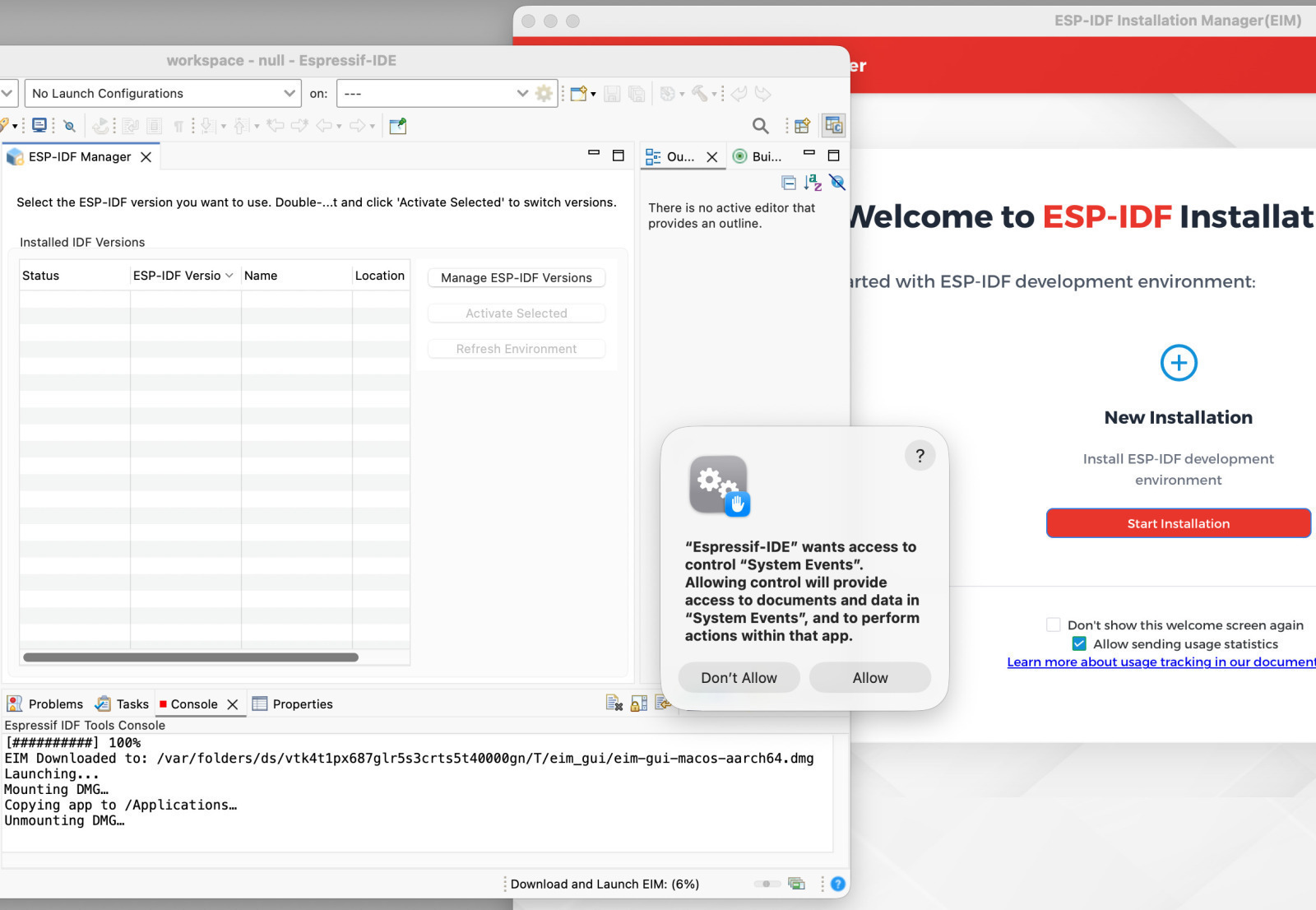
Technically, that EIM Installation Manager thing is completely uncalled for when you already have gigabytes of existing ESP-IDF installations on your system. Sadly, Espressif-IDE refuses to reuse them; this is due to a missing JSON file they invented for EIM.
I understand that a lot these things happen because it is genuinely hard for novice developers to get things going without a helping hand. ESP-IDF needs Python, so Python needs to be installed, etc. All that must be coordinated somehow. Ideally, however, a development environment should not require a network connection maybe except for very specific, known endpoints.
Having begrudingly accepted the interconnectness of things, I still can’t come to peace with the fact that it all looks very much shoehorned together, ultimately just reaching out to the core ESP-IDF’s idf.py script in many cases through Eclipse’s console pane.
In a sense, that’s a good thing, though. I really want command line tools be the driving interface, especially when it comes to continuous integration on some remote server. This is why I like the Maven integration in Eclipse, for example, which (for Java development) gives the best of both worlds, without locking you in with a specific IDE or vendor.
Nevertheless, for C/C++ development, Eclipse CDT / Espressif-IDE just doesn’t spark the joy in me, and I don’t want to install (and maintain) yet another IDE just for that usecase.
IDE, IDF, …, IDX?
From previous work experience (and probably not due to Stockholm syndrome), I got to really like Xcode for coding in C and related languages. Its code search (and ergnomics) just work well for me.
One can say though Xcode is the antithesis of an open system. It more or less looks like tailormade for the Apple ecosystem, although its Wikipedia page underlines its — former — versatility when it comes to programming languages…
That ecosystem changes every so often, especially with the addition of Swift and now with the integration of Apple Intelligence and Agentic Coding. The “plugin story” comes hard to Xcode, with a new name and new wineskins, but I have a feeling that I can count on Apple not to open the floodgates to crappy, insecure third-party integrations…
I was really excited when I heard about Apple embracing ESP32 with Embedded Swift, only to be immediately disappointed by seeing that there’s no Xcode integration (the WWDC video shows a text editor in the Terminal). There now is a very recent third-party take, but it appears to be Swift-only.
chitty chitty clang clang
Xcode plugin development is mostly a first-party event these days, although many hacks exist.
Well, I got to the point where I just want to use Xcode for all kinds of C/C++ development, not just for iOS & friends. I’m not really interested in any short-lived hackery, so I took a deep look to understand what Xcode “actually” does for me when I develop C: it calls clang, a lot.
clang is an Apache 2.0 licensed compiler frontend that was developed for the LLVM compiler suite, and at least now it’s got its own inofficial music video… :-) While clang is indeed used in the automotive industry, it’s worth nothing that any resemblance to an actual Apple product release video concerning an electric vehicle are purely coincidental.
Since it’s Apple, it’s no wonder that Apple Clang comes with all sorts of custom flags, bells and whistles that “regular” clang does not understand.
For example, code search and symbol resolution (a hard problem in C/C++ due to platform and macro shenanigans, etc.) are triggered by a custom --index-store-path flag during the “Indexing” phase (see this 2017 presentation by Apple LLVM develoeprs and this blog post by Nathan.fooo for details).
Apple Clang does not come with support for all the platforms vanilla LLVM Clang supports, and Espressif’s toolchains for their Xtensa and RISC-V platforms are also not fully upstreamed. Also, an Xcode project’s “Run Destination” is limited by Apple’s officially supported platforms (macOS, iOS, etc.).
Put simply, it’s just not possible to select these platforms from within Xcode, at least not with some magic.
But in our profession we’re certified magicians, so let’s get to it!
custom Xcode body kit toolchain
Based on earlier work around cross-compiling junixsocket (my Java library that adds Unix Domain Sockets, TIPC, and more to Java), I know that the most stable way to add new platform support to Xcode is to give Xcode what it wants, and that is a clang binary.
Not just any binary, but a wrapper script that allows Xcode thinking it’s building for macOS, where — in reality — it’s doing something entirely different. That involves some trial-and-error because not all flags are interchangeable between platforms, but the final script taking care of all is just around 300 lines. We also need a wrapper for clang++ (for C++), libtool (in lieu of llvm-ar) and a dummy lipo script to fake building a Universal Binary (if you forgot to build only for the current machine).
The scripts are wrapped in an xcesp.xctoolchain folder, which has an Info.plist to satisfy Xcode’s needs. Once that folder is symlinked from ~/Library/Developer/Toolchains, Xcode lets you switch from the “default” toolchain via the application menu (Xcode -> Toolchains); notably, this affects all open projects.
gcc-itty gcc-itty make-cmake
ESP-IDF’s default toolchain is still GCC-based, but clang is supported as a preview feature, which saves us from a complicated charade mimicking a clang frontend for a GCC backend.
Thankfully, the structure for ESP-IDF based projects is centered around CMake, a build system that not only emits Makefiles, but can also directly generate Xcode project files.
Nevertheless, it took me quite a while to get to a reliable Xcode project setup. Even though CMake does a solid job generating project files, the over 300 example projects in ESP-IDF can be quite complicated, involving scripts that in turn again run idf.py, need RISC-V coprocessor support on Xtensa chips, etc.
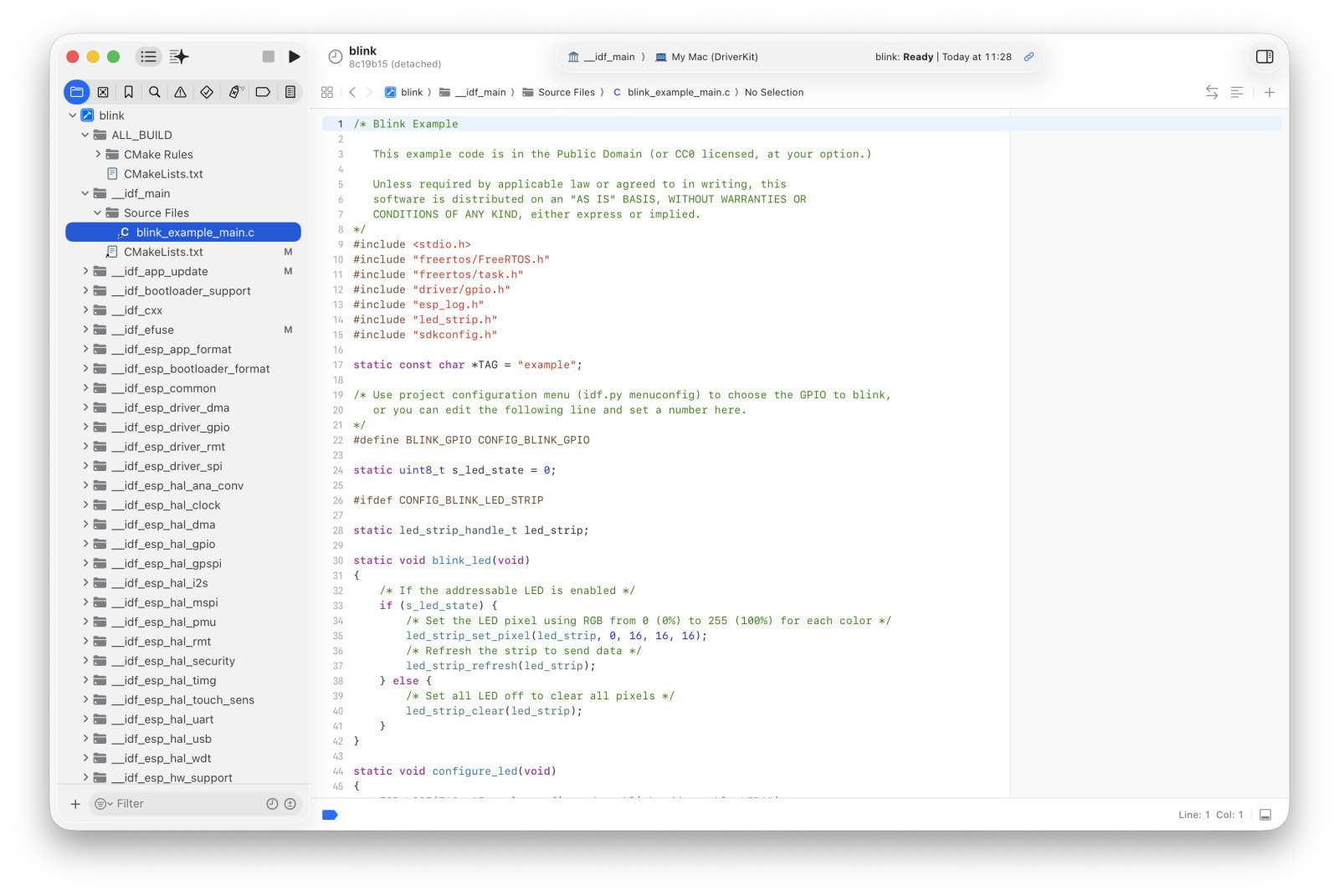
What’s great though about the Xcode project structure CMake creates, compared to Espressif-IDE, for example, is that you have the full view over all ESP-IDF components available for building (with the main code under __idf_main). This lets you not only navigate but easily modify core functionality during debugging.
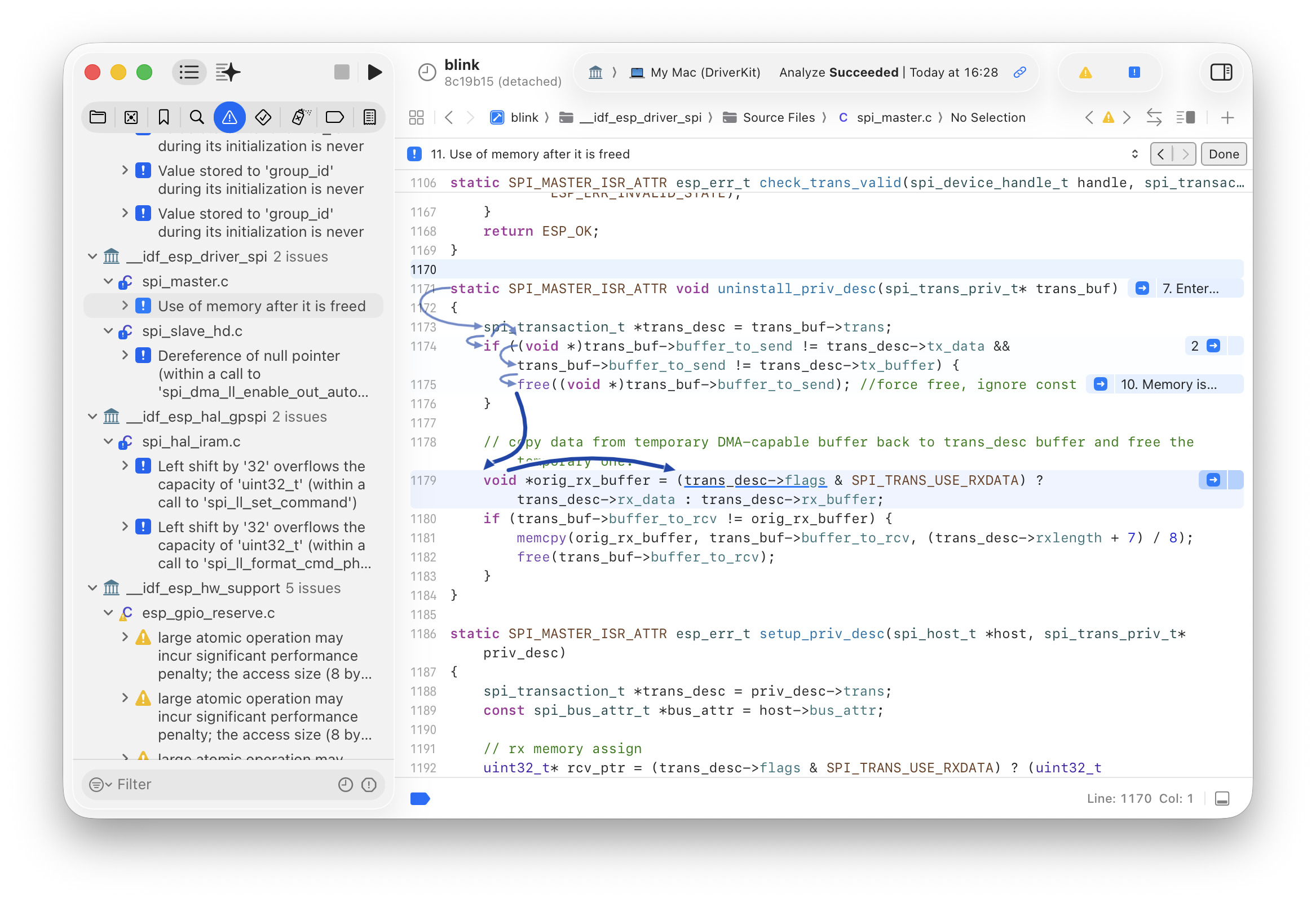
Analyzing code via clang is also a joy in Xcode, as it shows the flow of the bug using blue arrows. Here, we found a potential null pointer bug in ESP-IDF:
I’ve put the logic together in a zsh script named xcesp, which is used for opening and updating the Xcode project view of an ESP-IDF project — new files must be added to CMakeLists.txt just like for idf.py.
One trick worth noting is that my script uses the macOS DriverKit as the “SDK” visible from Xcode, which avoids the problem of showing now-false-positive search results in “Open Quickly”, etc.
xcesp also has shortcuts for flashing and monitoring a device, running idf.py menuconfig, setting device targets, etc.
All in all a very handy tool that lets me do all the things on the command line that I cannot do in Xcode (and probably wouldn’t do in Espressif-IDF either).
One thing that still needs a solution is debugging. While Xcode has built-in lldb support, I couldn’t find an easy way to attach Xcode’s internal LLDB to OpenOCD. If anyone has an idea how to achieve that, please let me know.
excess-p feature: Apple Intelligence
Since the script didn’t modify Xcode’s internals, a somewhat relevant aspect is that now, thanks to xcesp, you can indeed use “Apple Intelligence” features (i.e., coding agents/chatbots like Claude, Codex, Ollama, etc.) for your ESP-IDF development!
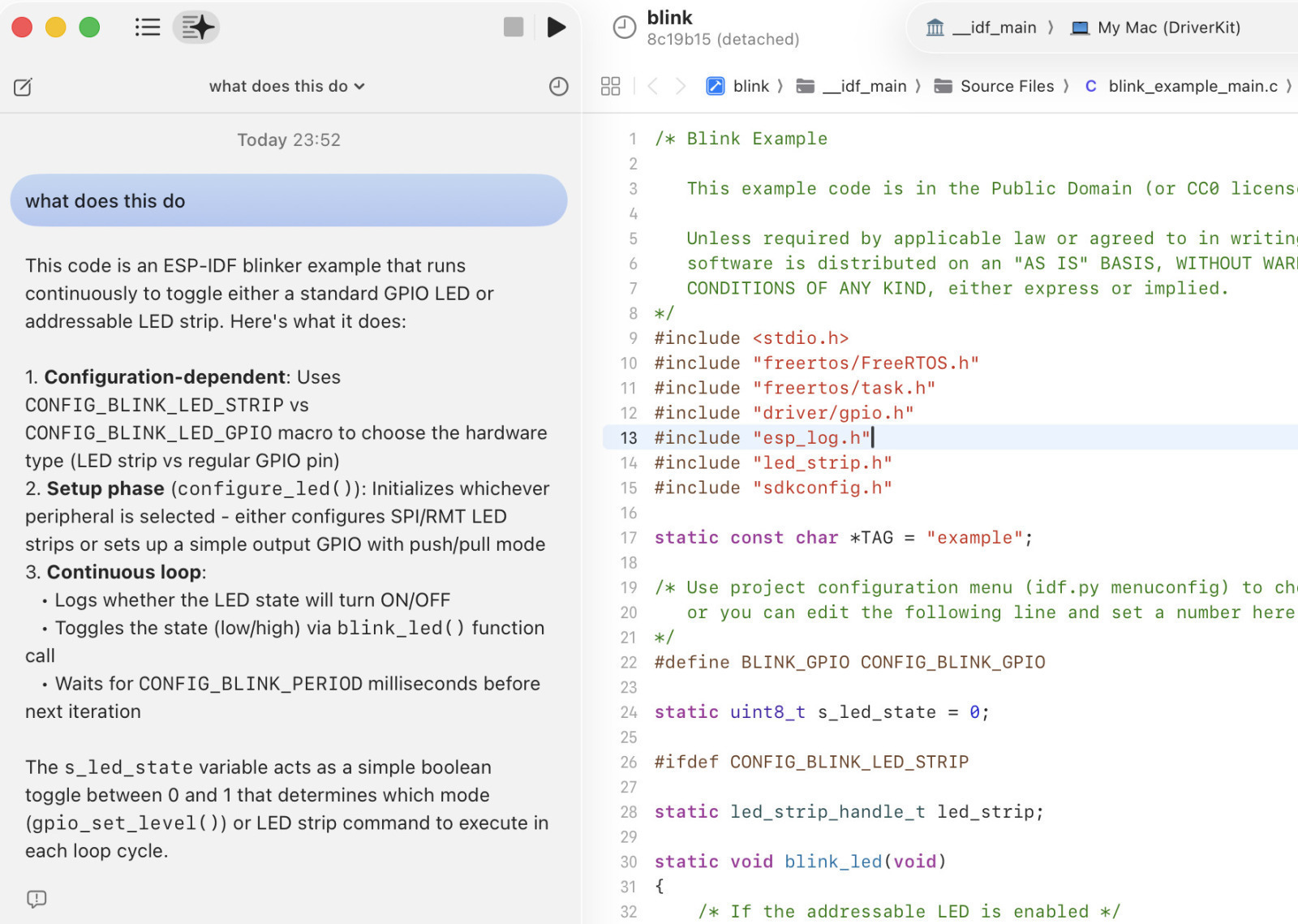
I haven’t quite looked into everything yet, but a local-only Ollama with Qwen3.5 is usable even on an MacBook Pro M1 Max.
Let’s build something
I’ve just released xcesp on GitHub. Please give it a try and let me know what you built with it!