Even in 2026, ordinary desktop computers regularly ship with measly 1 Gigabit built-in Ethernet ports, 2.5 Gbps if you’re lucky, and maybe 5 Gbps only if the manufacturer is optimizing for tech spec bingo.
Maybe it’s because these speeds are “just enough” for the masses?
What if you wanted faster speeds (for NAS, moderate homelabbing, fiber internet, etc.) though? You’d have to resort to PCIe cards, or most likely, USB 3 or Thunderbolt adapters.
With the recent arrival of a new low-cost 10 Gigabit family of NICs (PCIe RTL8127, ServeTheHome post, and USB RTL8159, Jeff Geerling’s post), Realtek makes upgrading your home network to 10GBASE-T (the 8-wire RJ45 copper kind) seemingly more appealing than ever. Is 10GbE in 2026 Finally Hitting the Tipping Point?
Don’t rush it though: With these Realtek adapters, you may not be getting the speeds you’re hoping for, at least not now.
This is specifically valid when working with macOS, but Linux also has its problems with the USB variants.
Realtek Drivers and Inter-Op: Why you should sit this one out
I will add the following caveat, which I found through extensive testing: the drivers for the new Realtek cards are just not there yet. I cannot recommend using them on macOS at all, and only reluctantly on Linux:
1. The USB-based RTL8159 usually runs in a slow “USB compatibility mode” (CDC)
You may currently be getting near line-speed (~9.4 Gbps) only when using the adapter on a USB 3.2 Gen 2x2 20 Gbps port.
Apple Macs do not have such ports, compliance with USB 3.2 Gen 2x2 is not required for USB 4 certification (USB4 20 Gbps is a different protocol). Many PCs don’t support these either. Even if you have a capable port, it’s probably the one you want to connect an external SSD to instead.
I’ve tested these USB adapters on my MacBook Pro M1 Max and Lenovo Tiny m920x machines (with comparable USB 3.2 Gen 2x1 10Gbps ports), running iperf3 both in unidirectional and bidirectional mode.
For an apples-to-apples comparison, here I mainly focus on direct 10G Realtek PCIe / Realtek USB network connections in various configurations.
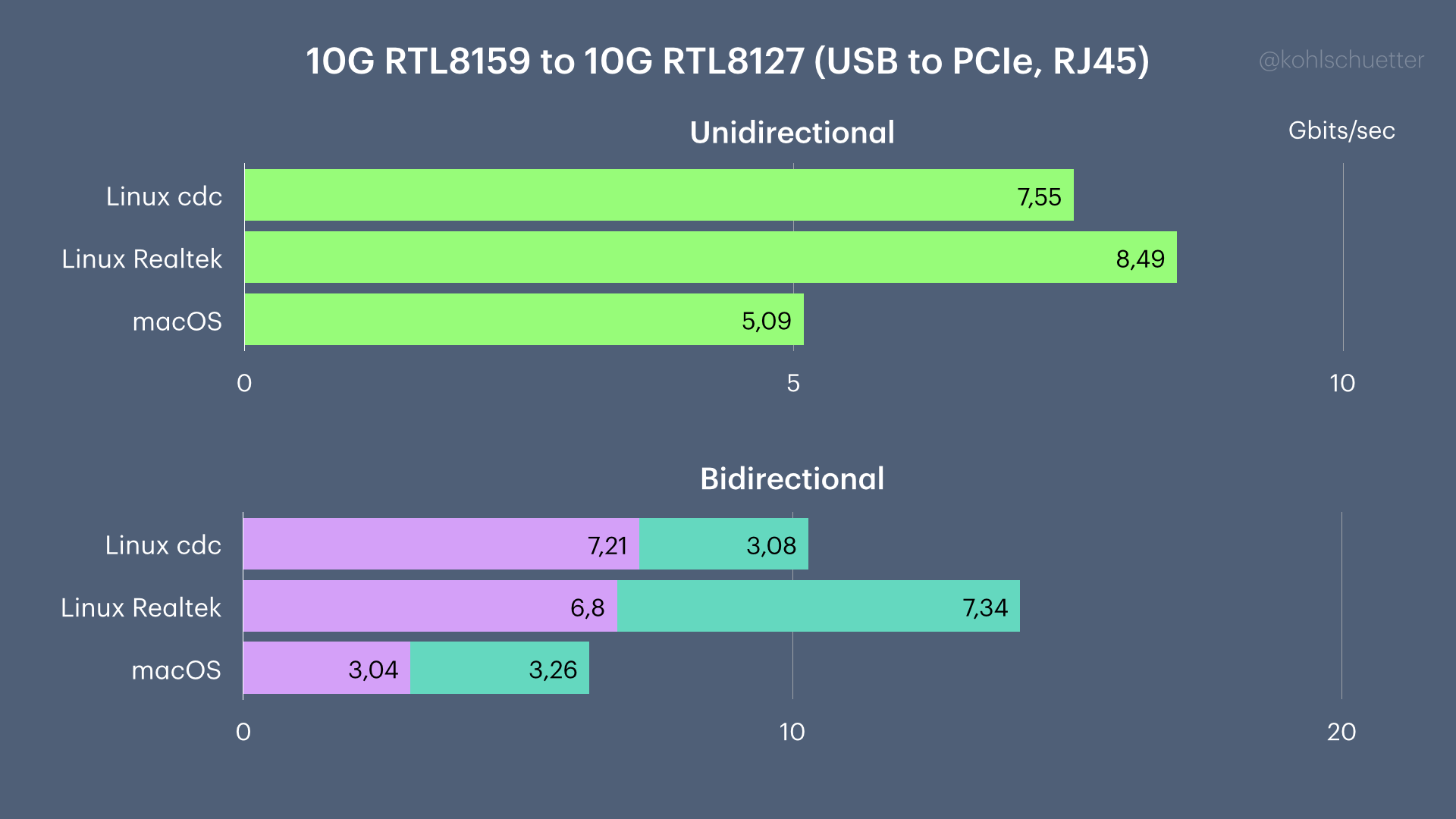
Only with Realtek’s “USB NIC Linux driver for kernel up to 6.15” (Github mirror with a patch for Linux 7.0.0), was I able to achieve decent speeds.
The driver is called r8152 v2.21.4, not to be conflated with the r8152 7.0.0 provided by the Linux kernel. The latter does not yet support 10G USB cards and will therefore not load. You may have it loaded if you’re testing with slower Realtek USB adapters.
On the PCIe side, it’s a bit better now: Since Linux 7.0.0 both RJ45 and SFP+ variants of RTL8127 are supported out of the box (r8127).
To see which driver is assigned to your ethernet card:
- find the right device (e.g.,
eth1) viaifconfig -a(orip addr list). Check by MAC address or assigned IP address. - run
ethtool -i eth1(assumingeth1is the device name) - Check the output for
driverandversion. If the value fordriveriscdc_ncm, you’re in compatibility mode (= slow). If the value isr8152, you have a Realtek driver. If the value forversionequals your kernel version, it’s a stock driver. If it is something likev2.21.4 (2025/10/18), you have the code provided by Realtek.
For USB, we also need to know the negotiated speed of the device on the bus. We need to rule out that the adapter is plugged into a slow port. We use lsusb from usbutils:
1
lsusb -v | grep -B1 Neg
(...)
Bus 002 Device 002: ID 0bda:815a Realtek USB 10/100/1G/2.5G/5G/10G LAN
Negotiated speed: SuperSpeed+ (10Gbps)
If you see anything negotiated below SuperSpeed+, either your USB port is too slow, your cable is not good enough, or there’s another interesting problem (be sure to try all SuperSpeed+ ports!)
To build and install the Realtek driver from source against some kernel, use the following command from its work directory:
1
2
3
4
5
6
7
make KERNELDIR=/path/to/kernel/source

# unplug USB adapter
rmmod r8153_ecm ; rmmod r8152
modprobe libphy
insmod r8152.ko
# plug USB adapter in again, then verify via ethtool
2. Mixing 10G and 1G Realtek adapters may result in abysmally slow speeds
In some setups, especially when connecting from a Mac with a 1G USB adapter (also with a Realtek chip) to a 10G Realtek PCIe card, the meager expected 941Mbps may drop significantly, in my case to an unreal 711Mbps. Keep that in mind if you want to mix old and new network gear.
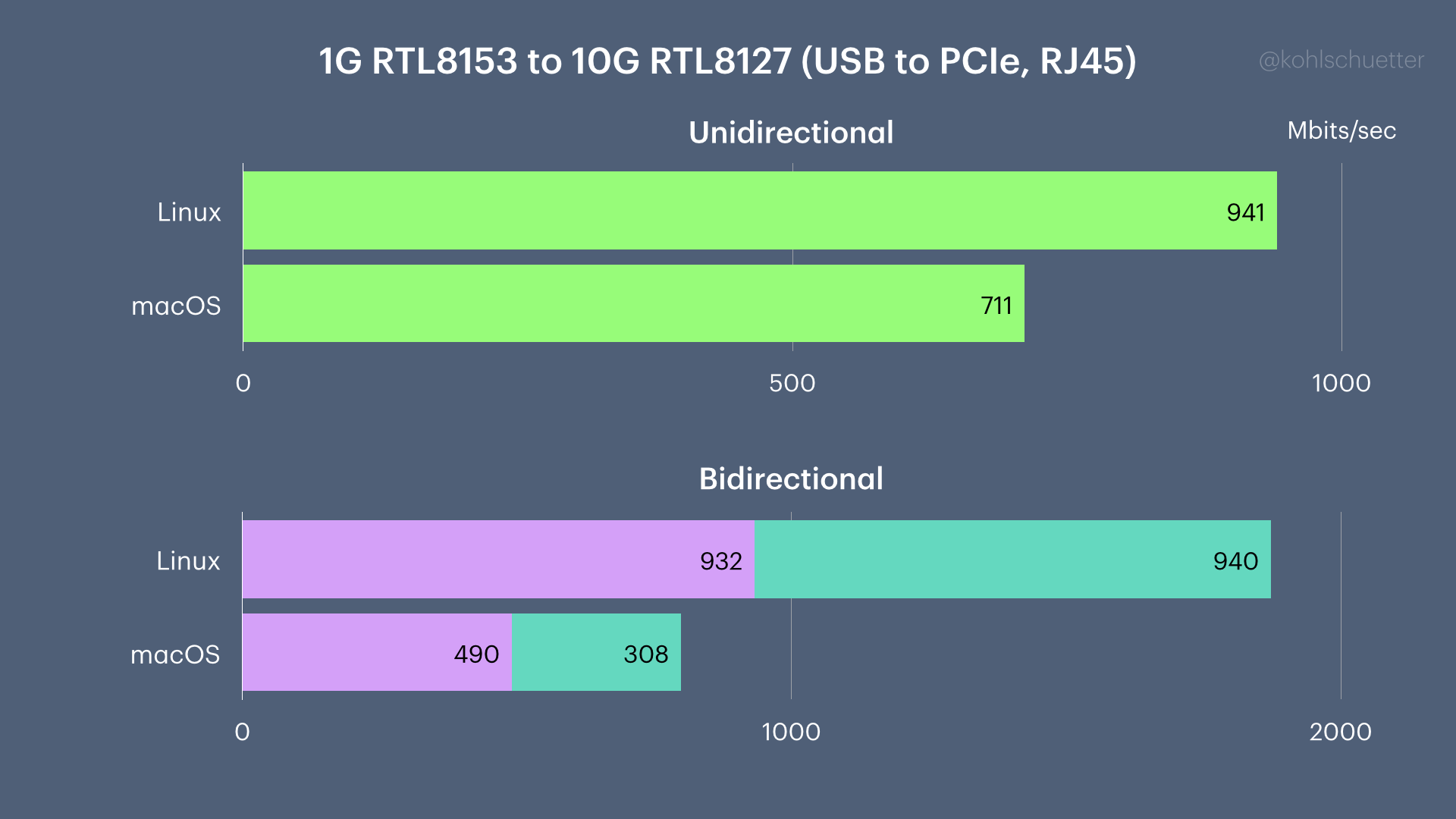
A switch between the two computers did not make a difference.
That said, I didn’t notice a problem when connecting from 2.5G adapters.
3. Serving on USB adapters: The direction matters?
Even though I was measuring iperf3 uni- and bidirectionally (using --bidir), it seems that for some settings it matters where you run the iperf3 server.
Using an Icybox 10G Thunderbolt RJ45 adapter (sporting the Aquantia AQ113 chipset) as a reference, I’m seeing no major discrepancy when connecting with the 10G RTL8127 PCIe, but significant differences when comparing the 10G USB adapter.
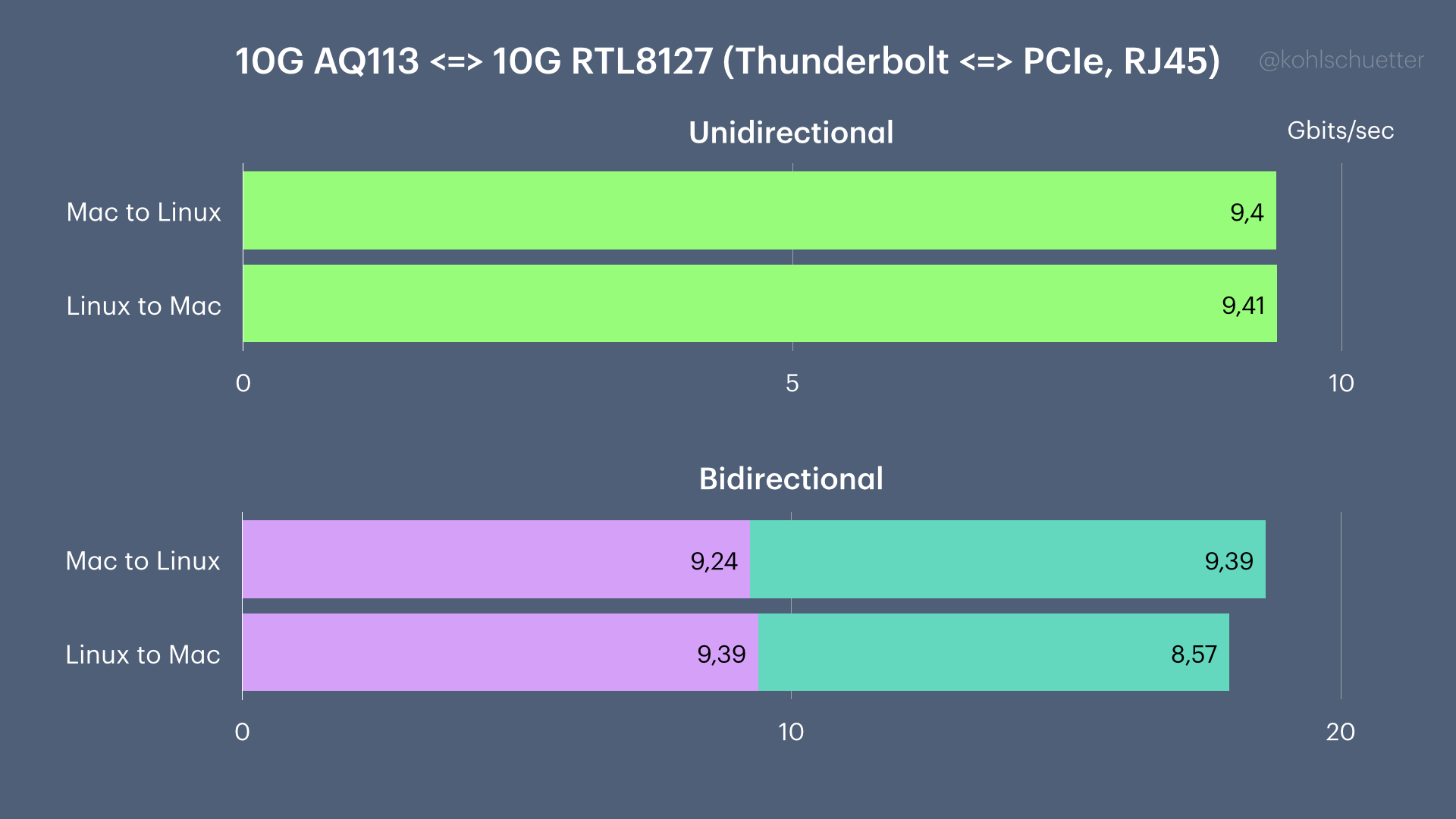
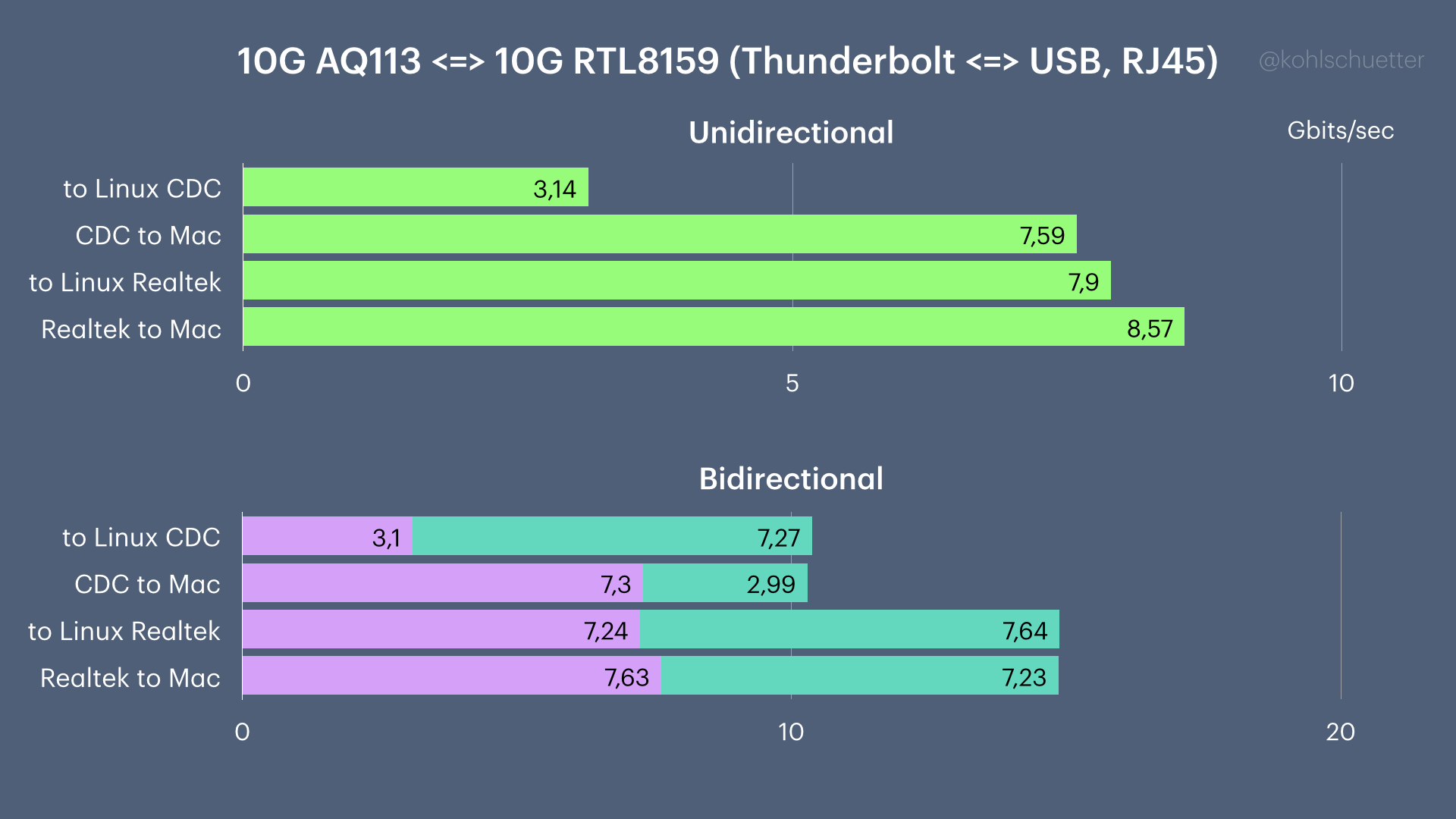
While the Aquantia AQ113 chipset runs hotter than the Realtek counterparts, at least for the moment that seems to be a better choice if you need line speed 10GBASE-T on macOS.
4. 5G Realtek adapters may actually be faster on macOS
If you really need speeds faster than 2.5G but don’t want to get the Aquantia, you can try the 5G Realtek adapters that can be had for very little money.
But be warned: In my testing, they were either not reliable on Linux (connection loss) or slow.
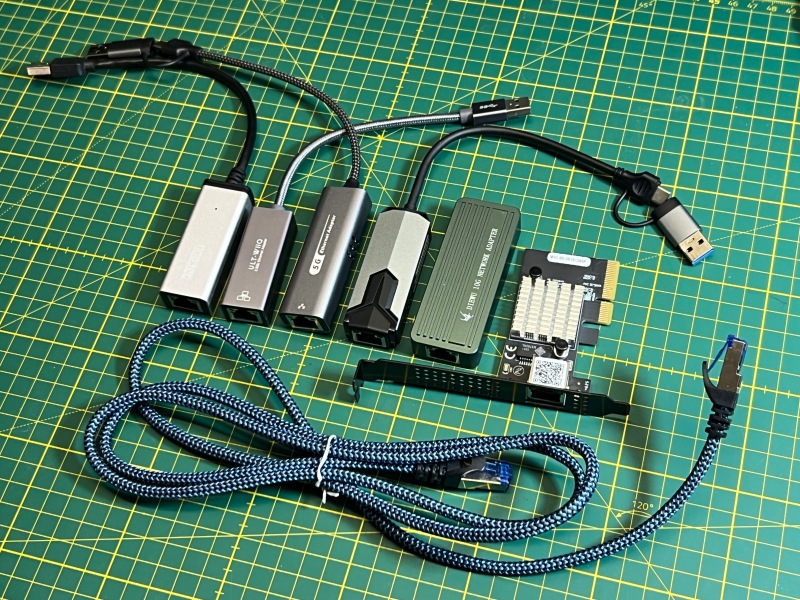
One of the two adapters (marked “5G Ethernet Adapter” in the photo above), would fail after a few seconds when plugged in one specific 10Gbps USB port but not in the other one. Another adapter (the one in the picture with the “gaming router style” plastic) would be reliable but slower because it always negotiated with USB SuperSpeed 5Gbps, not SuperSpeed+.
On macOS, these adapters would both work but use the slower CDC protocol, reaching around 3-4 Gbps.
5. Too many failure modes
As you can see there’s so much depending on individual circumstances whether the cards work as expected or not, much worse than in previous generations or when using chipsets of other manufacturers.
Don’t even get me started on the topics of Wake-on-LAN or Jumbo frames.
In my opinion, it’s really a shame that Realtek is not doing a better job working with the Linux and macOS community.
Conclusion and Outlook
Realtek, if you read this: Pretty please provide a real driver for macOS (and help upstreaming your changes to r8152 on Linux).
Maybe you want to work with Jeremy Quirke, who just released a DriverKit extension for the AQC111 USB 5Gbps adapter family? Adapting this code for RTL8159 shouldn’t be too hard?
My perspective on 10G+ networking
Unless you have to absolutely rely on your existing RJ45/Cat cabling (which may or may not work well with 10GBASE-T!), moving to SFP+ connectors opens up possibilities to future-proof fiber networking and power-efficient DAC cables.
10GBASE-T (the RJ45 connector kind) demands much more power than 2.5G Ethernet. If your usecase demands this speed range, consider these alternatives.
If you want to stick with Realtek 10G, try their SFP+ PCIe adapter (RTL8127AF). Just keep in mind that unlike many other SFP+/SFP28 cards, you don’t get any fancy features like SR-IOV, RDMA, channel bonding, etc., which you may find interesting sooner or later.
Inexpensive, fanless 2.5G switches with a 10G SFP+ uplink exist. Consolidate your “slow” devices over these older, less power-hungry switches.
Use dedicated 10G SFP+ switches (now also fanless and inexpensive) for your faster devices (SFP+/RJ45 combos exist too, because the last thing you want are 10G RJ45 transceivers in SFP+ slots — they can run very hot).
macOS: If you already are on fiber/DAC/SFP+, go straight to 25 Gigabit Ethernet via Thunderbolt, even if the rest of your network is 10G SFP+. You will not regret it.
When you’re eventually ready to upgrade your switches to 25G/100G, don’t throw the DAC cables out. You can most likely hack yourself an upgrade to SFP28 25G with a little trick.